epxzzy's sabers adds a variety of laser and plasma weaponry to Minecraft, featuring advanced combat mechanics and animations.
Obtaining
To attain the materials for a saber, you firstly need to have explored the nether, you'll first need to Defeat the Wither. Once slain, the Wither drops a Nether Star which can be crafted into a Krystal. This Krystal can then be duplicated like smithing templates. Craft it once, then dupe it. Adding to your fine collection. Without having to defeat multiple withers. It is also recommended to craft a KyberStation, it only costs one Krystal and you can use it as many times as you like without further cost.
Roleplay
Combat in epxzzysabers is more than just weaponry; it's about timing, positioning, and style.
Attacking
When an attack is triggered on an entity, one of eight positions are choosen at random (im working on a targeting system but for now they have to be random). these positions are:
- 1. Left Shoulder
- 2. Right Shoulder
- 3. Left Knee
- 4. Right Knee
- 5. Left Torso
- 6. Right Torso
- 7. Crotch
- 8. Head
these when choosen is where the attacking saber item will aim for/swing towards, you can see this in third person as well as the first person HUD indicator. Note: Sabers cannot do Critical hit damage, so there is no point in jumping around. [insert random attack gif]
Blocking
If an incomming attack is blocked via a saber, the saber item will be used to cover that position where the attack was aimed at. this is also reflected in third person as well as the first person HUD indicator. makes a clashing noise when a sucessful block is has happened. A visual indicator (wobby saber) is displayed in first person when the a saber is in hanging block.
Flourishes
Flourishes are when you spam LMB without hitting anything. flourishes feature three conditional animations based on player movement, orientation and saber type:
- Light Weapon Saber Type:
- X-Cross Front: Default animation when standing still.
- Behind the back spin: Played when looking down (X-rotation > 40).
- Twirl: Played while sprinting (Spinning has priority if looking down).
- Heavy Weapon Saber Type:
- X-Cross Front: Default animation when standing still.
- Around the world spin: Played when looking down (X-rotation > 40).
- Skip-Catch: Played while sprinting (Spinning has priority if looking down).
Stancing
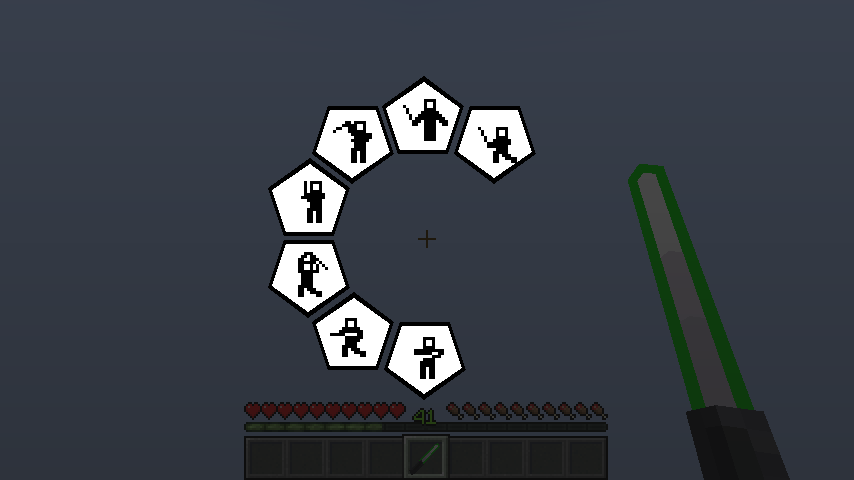
Press the [STANCE] key to assume a stance while crouching during blocking. Pressing SHIFT + [STANCE]. opens the stance preference menu. There are seven total stances available. Stances are primarily cosmetic but provide a unique visual identity to your combat style.
Available Stances:
- Shi-Cho: (Used by Luke Skywalker, Kit Fisto)
- Makashi: (Used by Count Dooku, Grand Inquisitor)
- Soresu: (Used by Obi-Wan Kenobi)
- Ataru: (Used by Qui-Gon Jinn, Master Yoda)
- Shien / Djem So: (Used by Anakin Skywalker, Ahsoka Tano)
- Niman: (Used by Darth Maul)
- Juyo / Vaapad: (Used by Mace Windu, Darth Sidious)
Keybinds
Ability Key
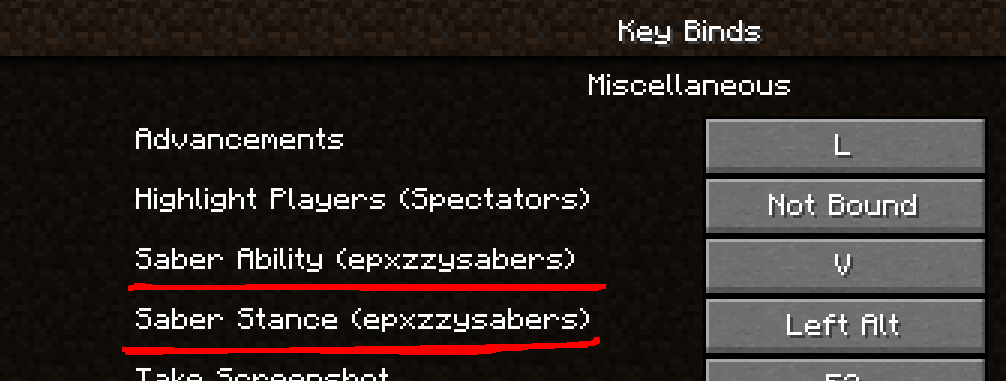
The ability key is used to activate special abilities while wielding a saber. This key is right now required by 3 different items. Located in Miscellaneous, [V] by default.
Stance Key
The Stance key is used to trigger stance. If held you will continue stancing. Pressing the key with shift will open stance preference menu. Located in Miscellaneous, [Left Alt] by default.
History
| 0.0.4 |
Added ability to stance with any item. Audio files converted from stereo to mono. Fixed recipe unlocks and server-side packet synchronization. Added glowing, color-matching item names for sabers. Fixed various bugs and crashes. |