This page documents the core saber combat systems, including attacking, blocking, parrying, and stances.
Attacking
Every saber tagged as epxzzysabers:lightsaber uses a randomized attack pool when striking an
entity. Each hit selects one of eight animations. This behavior applies to normal targets such as mobs and
players, and also to interactable entities like armor stands and item frames.
Heavy weapons, such as pikes and dual-bladed sabers, are routed through a separate handling path so they can support distinct animation sets in future updates. In the current implementation, attacking can sometimes trigger an unintended parry if a projectile is close enough to be caught by the saber.
Blocking
Saber attacks can be blocked by holding Right-Click, in a way similar to using a shield.
Saber blocking only protects against other weapons that are tagged as
epxzzysabers:lightsaber; it does not stop ordinary melee hits from non-saber weapons.
A saber can also block any projectile, but only if the block has been held for less than 25 ticks (1.25 seconds). Once that duration is exceeded, projectile blocking fails.
You do not need to manually match the angle of an incoming strike. The saber automatically synchronizes with other players so the correct blocking pose is used. The main requirement is facing the source of damage.
Parrying
Any arm swing with a saber, including attacking, mining, or even punching air, performs a parry. A parry redirects projectiles that enter the saber's active range. The size of that range depends on the weapon's specific Parry Range value, and redirected projectiles are sent back in the direction the player is facing.
Some projectile types may behave differently from standard arrows or blaster shots. Projectiles such as tridents and shulker bullets can be harder to redirect consistently.
Parries use one of three conditional animations:
- X-Cross Front: default animation while standing still.
- Spinning: played when looking downward (X-rotation greater than 40).
- Grievous Move: played while sprinting. Looking downward takes priority and uses Spinning instead.
Stancing
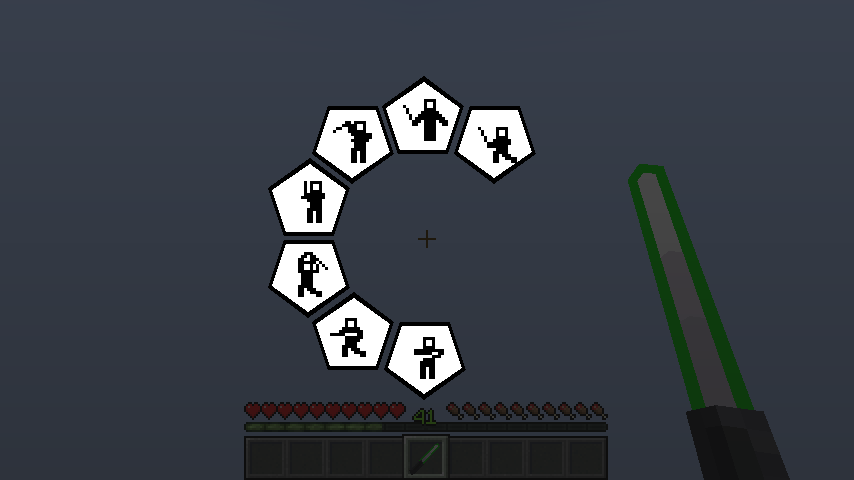
Press the [STANCE] key to assume a stance while crouching during blocking. Pressing SHIFT + [STANCE]. opens the stance preference menu. There are seven total stances available. Stances are primarily cosmetic but provide a unique visual identity to your combat style.
Available Stances:
- Shi-Cho: (Used by Luke Skywalker, Kit Fisto)
- Makashi: (Used by Count Dooku, Grand Inquisitor)
- Soresu: (Used by Obi-Wan Kenobi)
- Ataru: (Used by Qui-Gon Jinn, Master Yoda)
- Shien / Djem So: (Used by Anakin Skywalker, Ahsoka Tano)
- Niman: (Used by Darth Maul)
- Juyo / Vaapad: (Used by Mace Windu, Darth Sidious)
History
| 0.0.4 | Removed critical hits in saber weapons. |